
Executive Overview
The landscape of modern artificial intelligence development is dominated by pipelines. Whether engineering a sophisticated multimodal agent or stitching together a quick weekend prototype, developers rarely rely on a single, monolithic model. Instead, modern AI systems are assemblies of sequential and parallel tasks: an image is generated via text-to-image synthesis, its background is surgically excised, a specialized captioning model generates descriptive metadata, and an LLM converts that metadata into an engaging narrative script.
Historically, orchestrating these multi-step AI workflows required a cumbersome combination of Python scripts, asynchronous event loops, and endless print-debugging statements to isolate where an anomalous tensor or a malformed JSON payload broke the chain. The moment a pipeline expanded beyond a simple linear trajectory, developers found themselves tangled in orchestration frameworks that sacrificed user interface interactivity for backend control.
Enter gr.Workflow—a groundbreaking feature built directly into Gradio. By reimagining the pipeline as the interface, gr.Workflow bridges the gap between low-level programmatic orchestration and intuitive visual design. It allows developers to define complex AI operations as a directed graph of typed nodes, instantly rendering an interactive, drag-and-drop canvas where every individual step is runnable, and every intermediate result is transparently visible.
Far more than just a visual builder, every graph constructed via gr.Workflow natively doubles as a production-ready REST API and deploys with a single command to Hugging Face Spaces. This article provides an authoritative deep dive into the architecture, capabilities, practical implementations, and future roadmap of gr.Workflow, exploring how it is poised to redefine how developers compose and deploy modular AI applications.
Detailed Chronology and Technical Architecture
To understand the disruptive nature of gr.Workflow, one must examine the evolution of AI application interfaces. For years, the development paradigm bifurcated developers into two distinct camps: those building backend-heavy orchestration graphs (using tools like LangChain, Airflow, or custom Python scripts) and those building user interfaces (using frameworks like Streamlit or Gradio). While frameworks like Gradio democratized the creation of web UIs for single-model inference, chaining multiple models together typically meant writing complex custom state-management logic inside Python callback functions.
The Anatomy of a gr.Workflow Graph
gr.Workflow introduces a paradigm shift by treating the graphical workflow model as a first-class citizen of the user interface. At its core, every workflow is a directed graph comprising three primary categories of nodes:
- References (Inputs): The entry points of the workflow. These capture user-supplied text, uploaded images, raw audio, or pointers to external resources like Hugging Face datasets.
- Operators (Processors): The computational engines of the pipeline. An operator can be a standard Python function, a model hosted on Hugging Face Inference Providers, an external Gradio Space, or a specialized data transformation utility.
- Subjects (Outputs): The terminal points of the graph that render, display, or serialize the final results for the user.
By connecting these nodes through typed ports via a drag-and-drop canvas, developers establish explicit data contracts between pipeline stages. Because the typing system enforces compatibility between ports, runtime errors caused by mismatched data types are intercepted before execution even begins. Furthermore, because every node acts as an independent execution unit, developers can re-run isolated segments of a massive pipeline without triggering a full end-to-end recomputation—solving one of the most persistent bottlenecks in AI debugging.
Practical Implementations: Workflows in Action
The true versatility of gr.Workflow becomes apparent when observing how it handles diverse generative, analytical, and computational paradigms. Below, we examine five core workflows that showcase the breadth of the framework.
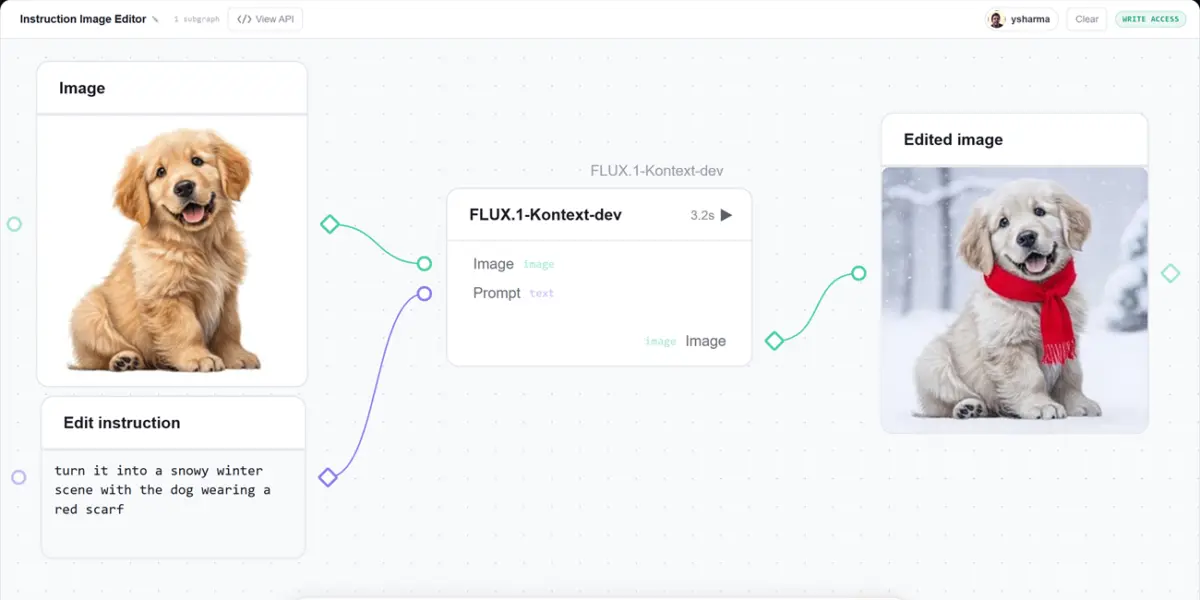
1. The Single-Node Image Editor Pipeline
The simplest implementation of a workflow graph is a focused, single-node transformation pipeline. In the Image Editor Pipeline, users upload a source image and provide a natural language edit instruction (e.g., "turn it into a snowy winter scene" or "add sunglasses"). Under the hood, a single operator node routes the inputs directly to the Qwen-Image-Edit model via Hugging Face Inference Providers, returning the modified visual asset instantaneously.
2. Chaining Real Models into a Media Studio
Real-world AI applications rarely rely on a single modality. The AI Media Studio demonstrates how gr.Workflow seamlessly orchestrates heterogeneous models across disparate infrastructure.
Starting from a single user-defined prompt, the graph executes three distinct pipelines simultaneously:
- Visual Synthesis: Generates a high-fidelity image using FLUX.1-schnell.
- Post-Processing: Passes the generated image to a background-removal Gradio Space to transform it into a clean, isolated sticker.
- Multimodal Expansion: Concurrently feeds the prompt into an LLM (
Qwen2.5-7B-Instruct) to generate a catchy episode title, while a text-to-speech Gradio Space (MeloTTS) synthesizes a professional voiceover.
This single canvas orchestrates two model calls through Hugging Face Inference Providers and two external Gradio Spaces, merging them into a unified, cohesive media production suite.
3. Fan-Out Image Generation in Parallel
Sequential processing is often a bottleneck when exploring creative concepts. The Generative Art Lab leverages the fan-out pattern to maximize creative throughput.
When a user inputs a single conceptual idea, the graph fans out to multiple operator nodes in parallel:
- A base image is synthesized using FLUX.
- The base image concurrently feeds two distinct style-transfer nodes—one rendering a soft watercolor interpretation and the other a neon cyberpunk reimagining.
- Simultaneously, an LLM node generates a creative gallery title based on the initial prompt.
All generational processes execute concurrently, demonstrating how gr.Workflow naturally handles asynchronous, parallel execution graphs without requiring complex threading code from the developer.
4. Profiling Hugging Face Datasets with "Data Detective"
Workflows are not limited to generative media; they are equally powerful for data engineering and exploratory analysis. The Data Detective workflow illustrates how tabular and unstructured datasets can be dynamically profiled.
Upon inputting a Hugging Face dataset identifier (such as stanfordnlp/imdb or mteb/tweet_sentiment_extraction), a single input reference fans out to four independent operator nodes leveraging the Datasets Server API. These nodes compute an overview metadata card, a data preview of initial rows, granular per-column statistics, and interactive distribution charts simultaneously and in parallel.
5. Executing Custom GPU Models via ZeroGPU
While calling external APIs and hosted models covers many use cases, developers frequently need to execute custom PyTorch models within their own infrastructure. The ZeroGPU Animator highlights how gr.Workflow bridges the gap between visual orchestration and raw hardware execution.
By decorating a standard Python function with @spaces.GPU, developers enable seamless integration with Hugging Face ZeroGPU. When the workflow graph triggers that specific node, ZeroGPU dynamically allocates a GPU for the duration of the call, executes the model (in this case, the Lightricks/LTX-Video diffusion model loaded via Diffusers), and immediately releases the hardware resources upon completion. The workflow orchestrator requires no complex configuration regarding cluster management; it simply interacts with the bound Python function.
Supporting Context, APIs, and Metrics
A critical strength of gr.Workflow is that every visual workflow is instantaneously an API, requiring zero boilerplate code or manual endpoint routing.
Automated REST and Python Client Integration
When a workflow is constructed, each designated output subject automatically exposes a REST endpoint named after its unique label. Developers can consume these endpoints programmatically via the gradio_client library or standard HTTP protocols.
For example, interacting with a multi-endpoint workflow via Python requires only a few lines of code:
from gradio_client import Client

# Connect to a public workflow API
client = Client("ysharma/gr-workflow-multi-endpoint-API")

# Invoke specific functional endpoints within the graph
print(client.predict("hello there friend", api_name="/word_count"))  # -> 3
print(client.predict(20, api_name="/fahrenheit"))                    # -> 68.0
For endpoints requiring authenticated model access or file uploads, the client natively supports secure token passing and file handle serialization:
from gradio_client import Client, handle_file

client = Client("ysharma/gr-workflow-image-editor", token="hf_...")

edited = client.predict(
    handle_file("dog.jpg"),
    "turn it into a snowy winter scene",
    api_name="/edited_image",
)
For systems engineers preferring raw HTTP interactions, every node endpoint is immediately addressable via standard curl commands:
curl -s https://ysharma-gr-workflow-multi-endpoint-API.hf.space/gradio_api/call/word_count
  -H "Content-Type: application/json" -d '"data": ["hello there friend"]'
Official Statements and Developer Onboarding
The introduction of gr.Workflow marks a significant milestone in Gradio’s mission to make machine learning accessible and deployable. According to core maintainers, the overarching goal was to eliminate the friction between prototyping an AI idea in a notebook and packaging it into an interactive, shareable web application.
"Most interesting AI apps are pipelines. We wanted to ensure that building a multi-model system felt as intuitive as drawing a flowchart, while retaining the enterprise-grade reliability of robust APIs and instant cloud deployments."
Getting started with gr.Workflow from a programmatic standpoint is exceptionally streamlined. Developers can instantiate a basic workflow with minimal syntax:
import gradio as gr

def your_function(text: str) -> str:
    return text.upper()

# Initialize and launch the workflow canvas
gr.Workflow(bind=[your_function]).launch()
For teams looking to migrate existing architectures, the recommended pathway is to explore the live demonstration spaces on Hugging Face, click Duplicate, and incrementally rewire nodes to suit custom business logic. Comprehensive documentation, JSON schema specifications, and advanced architectural patterns are maintained directly within the official Gradio Workflows Guide.
Future Outlook
The release of gr.Workflow represents the foundational layer of an increasingly sophisticated ecosystem for visual AI engineering. As multimodal models become more deeply integrated into daily software development workflows, the demand for transparent, debuggable, and modular pipeline interfaces will only accelerate.
Community roadmap hints and developer previews suggest even more ambitious horizons. Notably, the Gradio engineering team has teased upcoming capabilities that will allow developers to construct highly intricate, stateful application ecosystems—comparable in scope and complexity to community heavyweights like AUTOMATIC1111’s Stable Diffusion WebUI—entirely within the gr.Workflow paradigm.
By unifying the user interface, the execution graph, and the API layer into a single cohesive abstraction, gr.Workflow empowers individual developers and enterprise engineering teams alike to build, test, and deploy sophisticated AI pipelines faster and with greater visibility than ever before. Keep an eye on upcoming releases as the community continues to push the boundaries of what is possible with visual AI programming.
