

Executive Overview
The landscape of AI-assisted software engineering and data science is undergoing a fundamental transformation. For years, developers have relied on web interfaces, chat windows, or third-party extensions to interact with frontier models. However, the paradigm is shifting toward deeply integrated, agentic terminal interfaces that can operate autonomously across local filesystems, execute code, debug errors, and handle deployment pipelines end-to-end.
At the center of this shift is xAI’s latest frontier model, Grok 4.6, and its native terminal coding environment, Grok Build. Designed specifically for complex coding tasks, agentic workflows, and knowledge work, Grok 4.6 boasts performance that matches industry benchmarks like GPT-5.6 Sol on the Artificial Analysis Intelligence Index. By coupling this advanced model with an interactive, full-screen Terminal User Interface (TUI), xAI has provided developers with a powerful tool capable of managing entire lifecycles of software and data science projects from a single command-line interface.
This report examines the capabilties of Grok 4.6 and Grok Build by analyzing a practical implementation: constructing an end-to-end data science project that predicts coffee shop customer wait times using just four strategic prompts. From raw data generation and exploratory analysis to model training, FastAPI development, and cloud deployment, this walkthrough highlights how modern AI agents are redefining developer productivity.
Detailed Chronology: Building a Coffee Wait-Time Predictor in Four Prompts
To evaluate the operational readiness and autonomy of Grok Build powered by Grok 4.6, an experimental project was initiated to build a production-grade machine learning application. The objective was straightforward: predict how long a customer must wait for a coffee order based on features like time of day, order size, queue length, weather, and staffing levels.
Setup and Initialization
The process began by preparing the local machine environment. Grok Build offers prebuilt installation scripts across major operating systems. For macOS, Linux, and Windows Subsystem for Linux (WSL), the installation is executed via a simple terminal command:
curl -fsSL https://x.ai/cli/install.sh | bashFor Windows users utilizing PowerShell, the setup requires:
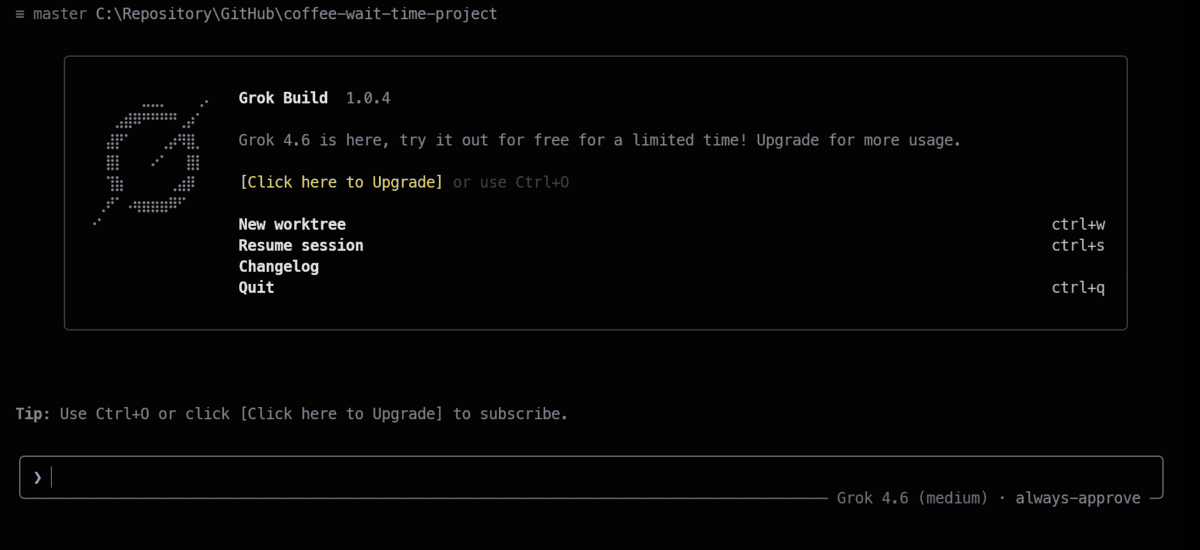
irm https://x.ai/cli/install.ps1 | iexOnce installed, verifying the version (grok --version) returned grok 1.0.4, confirming a successful setup. A clean project directory (coffee-wait-time-project) was initialized, and Grok Build was launched inside the workspace by simply typing grok. Upon first launch, the TUI prompted for browser-based authentication before dropping the user into an interactive, mouse-enabled terminal interface.
Step 1: Generating and Exploring the Dataset
Rather than hunting for an external dataset, the first step leveraged Grok Build’s agentic capabilities to synthesize, clean, and analyze realistic operational data from scratch.
- Prompt:
“Create a beginner-friendly end-to-end data science project by generating 3,000 realistic coffee shop orders with customer waiting time as the target, save the dataset in data/coffee_shop_orders.csv, perform data cleaning and exploratory analysis, and save useful visualizations inside reports/figures.”
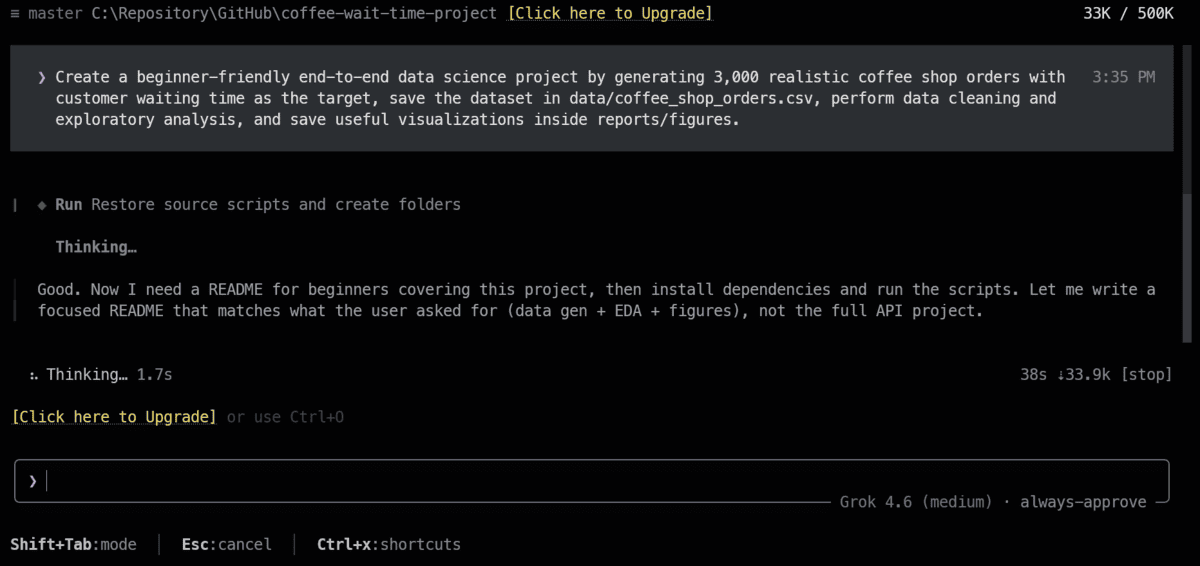
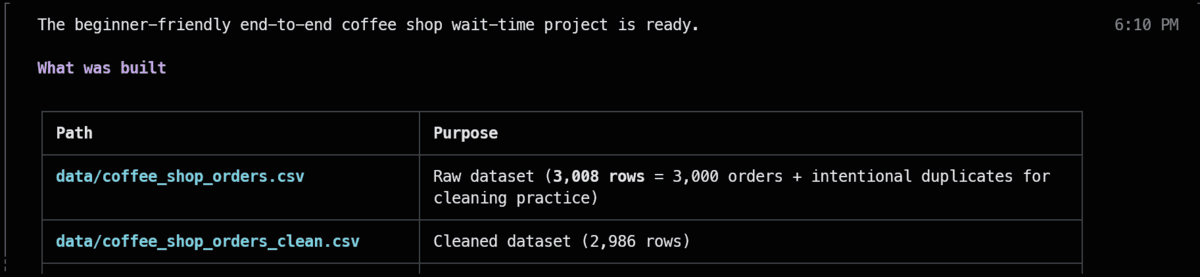
Upon receiving the prompt, Grok Build audited the workspace, drafted a Python script to simulate realistic coffee shop dynamics, and executed it. Within minutes, the agent successfully generated the raw dataset and processed a cleaned version containing 2,986 rows, systematically handling missing values and pruning 14 extreme wait-time outliers.
Exploratory Data Analysis (EDA) scripts generated by the agent yielded immediate operational insights:
- The baseline average wait time hovered around 10.5 minutes.
- Rush-hour conditions introduced an average delay of 3.3 minutes.
- Staff load exhibited the strongest positive correlation with wait times, scoring a robust 0.68.
Additionally, Grok Build constructed a baseline Random Forest model within this initial phase, achieving a Mean Absolute Error (MAE) of 1.63 minutes and an $R^2$ score of 0.85.
Step 2: Training and Evaluating Rigorous Machine Learning Models
With clean data secured, the next objective was to establish a robust, production-ready modeling pipeline incorporating multiple machine learning algorithms.
- Prompt:
“Prepare the coffee shop data using a reusable scikit-learn preprocessing pipeline, train Linear Regression, Random Forest, and Gradient Boosting models, compare them using MAE, RMSE, and $R^2$, evaluate the best model with charts and test predictions, and save the complete winning pipeline as models/coffee_wait_time_pipeline.joblib.”
Continuing seamlessly from the previous step, Grok Build authored a modular scikit-learn pipeline. During this execution phase, free-tier usage limits were reached. After upgrading the account tier, a simple directive to "continue" prompted the agent to pick up precisely where it left off without losing context or state.
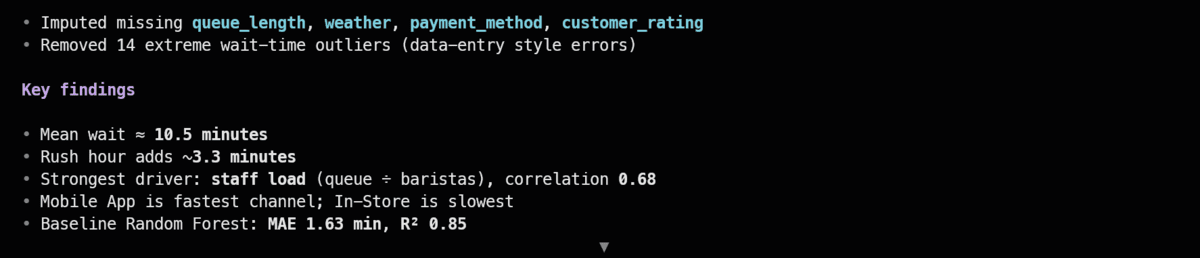
The agent trained three distinct algorithms—Linear Regression, Random Forest, and Gradient Boosting—and evaluated them against a hold-out test set comprising 598 orders.
- Gradient Boosting emerged as the clear winner, recording:
- MAE: 1.101 minutes
- RMSE: 1.408 minutes
- $R^2$: 0.934
Linear Regression performed commendably as a baseline, while Random Forest secured third place. The winning pipeline was serialized and saved directly to models/coffee_wait_time_pipeline.joblib.
Step 3: Engineering a FastAPI Application
Transitioning from offline model training to an interactive software service requires an API wrapper. The third prompt tasked the agent with building a production-grade web service.

- Prompt:
“Create a beginner-friendly FastAPI application in main.py that loads models/coffee_wait_time_pipeline.joblib, provides root, health-check, and prediction endpoints, validates coffee order inputs with Pydantic, returns the estimated waiting time and a short explanation, handles errors clearly, and includes examples in the automatic API documentation.”
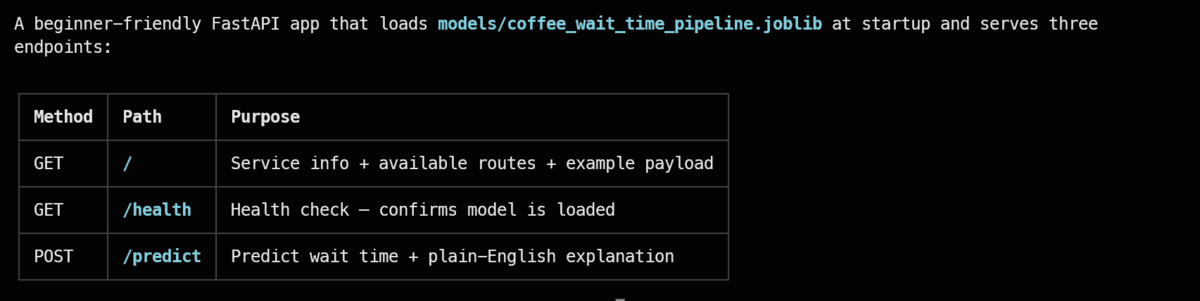
Grok Build constructed a robust main.py script. The application loads the serialized pipeline upon initialization and exposes three core endpoints. To ensure enterprise-grade stability, the agent integrated Pydantic for strict input validation, ensuring that malformed payloads trigger clear, structured error responses rather than unhandled server exceptions.
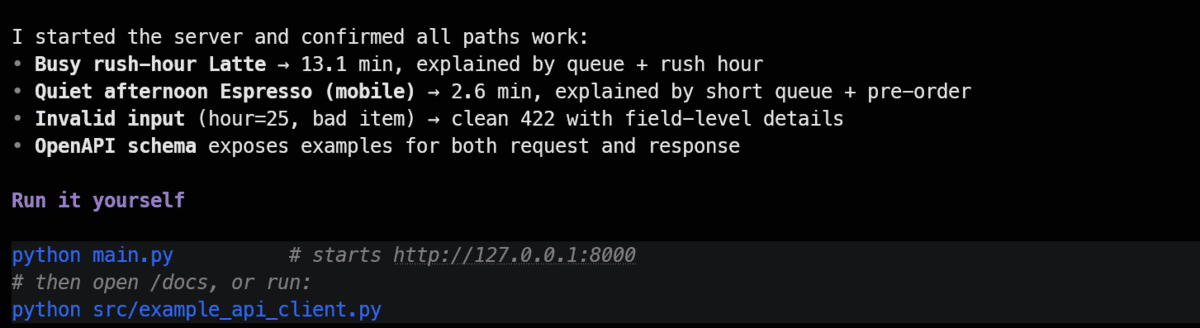
Before proceeding to deployment, Grok Build was instructed to perform self-diagnostic testing. The agent spun up a local development server, fired automated HTTP requests against the endpoints, validated the response schema, and confirmed that predictions were successfully computed.
Step 4: Cloud Deployment and Production Verification
The final phase of the development lifecycle involved pushing the application to a live cloud environment and verifying end-to-end functionality.
- Prompt:
“Prepare this project for FastAPI Cloud by confirming fastapi dev works, configuring the application entry point if needed, ensuring the saved model and required files are included, running fastapi deploy, pausing only if browser authentication is required, testing the live root, health, prediction, and docs endpoints, fixing deployment errors, and showing me the final public API URL.”
Following a brief browser authentication step for FastAPI Cloud, Grok Build finalized deployment dependencies, packaged the model artifact, and pushed the application to production.
Upon successful deployment, the agent supplied a public Swagger documentation URL alongside a production-ready curl testing command:
curl -X POST https://coffee-wait-time.fastapicloud.dev/predict
  -H "Content-Type: application/json"
  -d '"order_date":"2025-03-13","hour_of_day":8,"item_name":"Latte","item_size":"Medium","quantity":1,"customization_count":2,"order_channel":"In-Store","payment_method":"Card","queue_length":5,"num_baristas":2,"weather":"Rainy","is_member":1,"order_total":5.50'
The live production API returned a structured JSON payload:
  "predicted_wait_time_minutes": 13.06,
  "explanation": "Estimated wait time is about 13.1 minutes, mainly due to a moderate queue (5 people), rush-hour timing.",
  "model_name": "Gradient Boosting",
  "model_metrics":
    "MAE": 1.101,
    "RMSE": 1.408,
    "R2": 0.934
Verification through the live Swagger UI confirmed that predictions, model metrics, and natural language explanations were operating seamlessly in a live production environment. Finally, Grok Build auto-generated a comprehensive README.md outlining the project architecture, performance statistics, and reproduction guidelines.
Supporting Context & Metrics
The successful execution of this end-to-end project sheds light on several key metrics regarding the current state of frontier AI models:
- Model Parity: According to xAI’s internal benchmarks and independent evaluations on the Artificial Analysis Intelligence Index, Grok 4.6 achieves parity with top-tier competitors such as GPT-5.6 Sol, specifically in domains requiring multi-step reasoning and programmatic execution.
- Context Retention: Throughout the project lifecycle—spanning data synthesis, hyperparameter evaluation, API construction, and cloud deployment—Grok 4.6 demonstrated exceptional state retention. Interruptions caused by usage tier limits were handled gracefully without context drift.
- Error Resilience: By operating directly within a TUI environment with shell access, Grok Build can autonomously read compiler warnings, install missing dependencies, adjust script paths, and re-run failed test cases without human intervention.
Official Statements and Industry Reception
The release of Grok 4.6 and Grok Build marks a strategic push by xAI into professional developer tooling. Industry analysts have noted that by building an integrated Terminal User Interface specifically optimized for its proprietary model, xAI has bypassed the latency and context bottlenecks typically associated with third-party extensions.
"We designed Grok Build to be a native extension of the developer’s workflow," noted xAI engineering representatives during initial model briefings. "By pairing Grok 4.6’s long-running agentic capabilities with a dedicated terminal interface, developers can delegate complex, multi-stage engineering tasks with confidence that the model can test, debug, and ship its own work."
Early adopters in the data science community have drawn direct comparisons between Grok Build and established tools like Claude Code, highlighting Grok’s robust handling of raw data pipelines and autonomous deployment workflows as a major differentiator.
Future Outlook
The integration of advanced frontier models directly into command-line tooling signals a broader shift in how technical projects will be conceived and executed in the coming years. Rather than spending hours writing boilerplate data cleaning scripts, configuring scikit-learn pipelines, and debugging FastAPI routing errors, data scientists and software engineers are increasingly transitioning into supervisory roles—acting as architects and directors while AI agents handle execution.
As xAI continues to refine Grok 4.6 and expand the capabilities of Grok Build, future iterations are expected to introduce deeper support for distributed computing frameworks, automated CI/CD pipeline generation, and real-time monitoring of deployed machine learning models. For technical professionals, mastering agentic terminal workflows is rapidly shifting from a novel productivity hack to an essential competency in modern software engineering.
