

Executive Overview
The landscape of artificial intelligence is undergoing a significant architectural shift. While cloud-hosted foundation models accessible via commercial APIs remain dominant for mass-market applications, on-device and edge inference has transitioned from an experimental niche into a critical paradigm for software engineering. Driven by the proliferation of highly capable Small Language Models (SLMs)—ranging from 1B to 8B parameters—developers, security-conscious enterprises, and researchers are increasingly shifting workloads to local execution environments.
Running generative models locally eliminates network latency, guarantees absolute data privacy, eliminates per-token API costs, and offers operational independence from centralized cloud providers. However, deploying a local model requires an inference engine to handle matrix multiplication, context management, memory mapping, and hardware acceleration across heterogeneous compute platforms (such as NVIDIA CUDA, Apple Metal, AMD ROCm, and Vulkan).
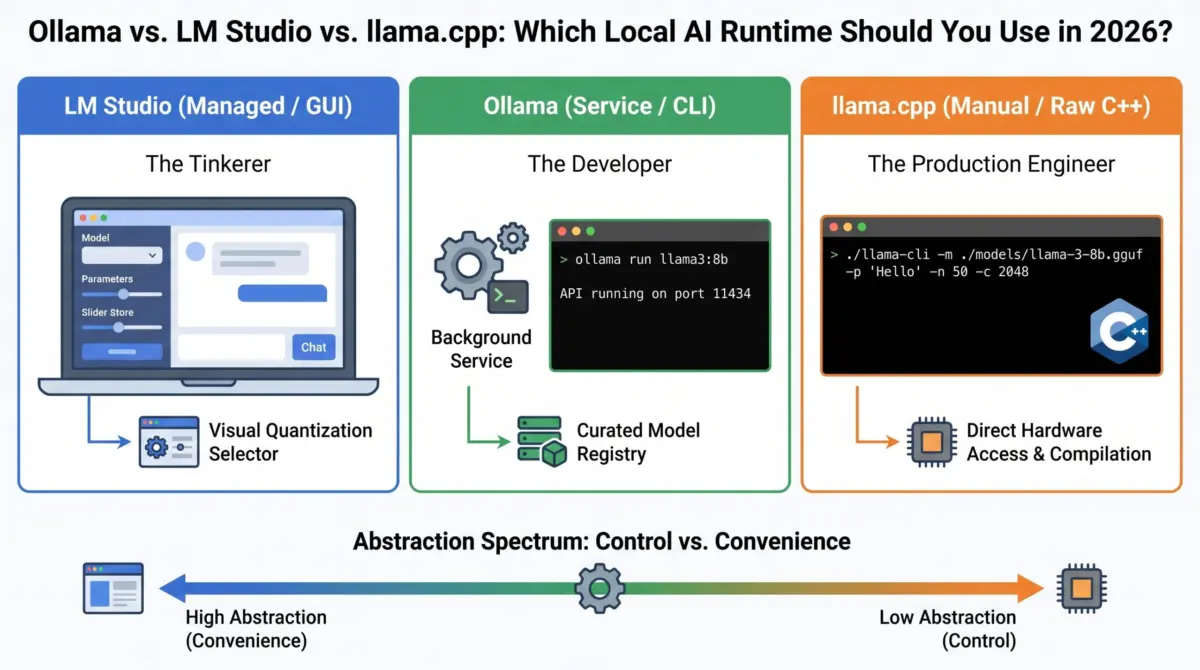
Within this ecosystem, three dominant runtimes have emerged to control local execution: llama.cpp, Ollama, and LM Studio.
While all three runtimes leverage the exact same underlying compute engine—Georgi Gerganov’s low-level C/C++ backend—they represent radically different points along the abstraction spectrum. Choosing the right tool requires evaluating developer ergonomics against explicit parameter control. This engineering analysis provides a multi-axis comparison of these runtimes, tracing their architectural evolution, detailing their integration patterns, and evaluating their suitability across distinct engineering workflows.
Detailed Chronology: The Evolution of Local Inference Engines
Understanding the local AI ecosystem requires analyzing how these runtimes evolved from raw C++ implementations into consumer-ready desktop applications and background daemons.
+-----------------------------------------------------------------------------------+
| CHRONOLOGICAL EVOLUTION OF LOCAL AI RUNTIMES                                       |
+-----------------------------------------------------------------------------------+
|                                                                                   |
|  [Feb 2023] Meta releases initial LLaMA weights                                   |
|       |                                                                           |
|       v                                                                           |
|  [Mar 2023] Georgi Gerganov creates llama.cpp                                     |
|             • Pure C/C++ execution                                                |
|             • Apple Silicon Metal optimization                                    |
|             • Pioneer of GGML (later GGUF) quantization                           |
|       |                                                                           |
|       +-----------------------------------+                                       |
|       |                                   |                                       |
|       v                                   v                                       |
|  [Mid-2023] LM Studio Launches      [Late-2023] Ollama Engine Debuts            |
|       • Visual model exploration          • Docker-like containerized CLI         |
|       • GUI hardware estimator            • Background system daemon              |
|       • Embedded local REST server        • Modelfile-driven configuration        |
|       |                                   |                                       |
|       +-----------------------------------+                                       |
|       |                                                                           |
|       v                                                                           |
|  [2024–Present] Ecosystem Convergence & Standardization                           |
|       • Universal adoption of GGUF format specification                           |
|       • Standardized OpenAI-compatible HTTP endpoints across all runtimes        |
|       • Enterprise edge integrations & continuous batching capabilities            |
+-----------------------------------------------------------------------------------+
March 2023: The LLaMA Moment and Georgi Gerganov’s Breakthrough
When Meta AI open-sourced its original LLaMA architecture in early 2023, standard deep learning frameworks like PyTorch and Hugging Face Transformers required massive VRAM footprints and complex Python dependencies. Shortly thereafter, open-source developer Georgi Gerganov released llama.cpp. Written in pure C/C++ without external dependencies, llama.cpp democratized LLM execution by allowing quantised weights to run efficiently on standard consumer hardware—most notably utilizing Apple’s Apple Silicon (M-series) Unified Memory via the Metal API. Gerganov introduced specialized binary tensor formats (first GGML, and later the unified GGUF format), proving that 4-bit integer quantization could preserve model reasoning while reducing memory footprints by up to 75%.
Mid-2023: The Usability Gap and the Rise of LM Studio
While llama.cpp unlocked raw hardware capabilities, its command-line interface demanded significant manual input: users had to manually compile binaries, pass explicit offload flags, keep track of tensor split parameters, and download weights via separate command-line utilities. To bridge this gap for non-systems developers, LM Studio emerged as a native desktop platform. Built with an Electron front-end wrapping embedded C++ bindings, LM Studio introduced visual model discovery (linking directly to Hugging Face), interactive hardware memory estimation, real-time parameters tweaking via sliders, and one-click local server execution.
Late-2023: Developer Ergonomics and the Rise of Ollama
Simultaneously, server-side and application developers needed an abstraction layer that behaved less like a desktop application and more like a background platform tool—akin to Docker. This drove the launch of Ollama. Ollama packaged llama.cpp inside a Go-based system daemon managed via a clean, Docker-inspired CLI (ollama pull, ollama run). Crucially, Ollama introduced the concept of the Modelfile (modeled after Dockerfiles), allowing developers to package model weights, system prompts, hyperparameter configurations, and chat templates into reproducible artifacts.
2024–2026: Standardization and Enterprise Acceleration
Today, the local AI runtime ecosystem has matured into a multi-tiered software stack. While llama.cpp serves as the foundational, bleeding-edge engine upstream, Ollama and LM Studio continuously pull its core optimizations while maintaining distinct user interfaces, targeting production API orchestration and interactive research respectively.
Supporting Context & Metrics: Structural Analysis Across Five Axes
To determine which runtime fits a specific engineering workflow, we must analyze them across the five fundamental dimensions of local inference execution.
                     ABSTRACTION SPECTRUM
High Ergonomics / Managed                    Low Abstraction / Direct Control
<--------------------------------------------------------------------------->
[ LM Studio ]             [ Ollama ]                     [ llama.cpp ]
• Graphical UI            • CLI & Background Daemon      • Raw C++ Binary
• Visual Tuning           • Docker-style Workflow        • Dynamic Flag Control
• One-Click Server        • Persistent Local API         • Direct Memory Mapping
1. The Interface Layer (GUI vs. Daemon vs. Bare Binary)
- LM Studio (Desktop GUI): Operates as a centralized graphical workspace. It provides visual chat interfaces, token generation throughput counters (tokens per second), memory utilization graphs, and dynamic system prompt editors.
- Ollama (CLI & Background Daemon): Operates headless. The background service (
ollamad) runs silently in the OS utility layer, managing model lifetime, auto-loading tensors into memory upon request, and unloading them after idle timeouts. - llama.cpp (Raw CLI & Binary Tools): Provides direct command-line execution (
llama-cli,llama-server). It features zero UI abstractions; execution state is passed entirely through terminal arguments, making it ideal for continuous integration pipelines or headless cloud deployments.
2. The Integration Layer (OpenAI API Compatibility)
Building software applications requires local runtimes to mimic standard cloud endpoints.
                          OPENAI COMPATIBILITY ARCHITECTURE

 Client Request: POST http://localhost:[PORT]/v1/chat/completions
   |
   +---> [LM Studio]  --> Port 1234  (GUI Server Toggle / On-Demand)
   |
   +---> [Ollama]     --> Port 11434 (Always-On Daemon Background Listener)
   |
+---> [llama.cpp] --> Port 8080 (Executable `llama-server` process)- LM Studio: Offers an embedded local HTTP server running by default on port
1234. It presents an explicit OpenAI-compatible routing schema (/v1/chat/completions,/v1/models), allowing drop-in SDK replacements. - Ollama: Exposes a persistent local REST API on port
11434. It provides both native endpoints (/api/generate,/api/chat) and fully standard OpenAI-compatible endpoints (/v1/chat/completions). Because the daemon is always listening, developers can target local inference without initiating a UI process. - llama.cpp: Includes a standalone native binary—
llama-server—that launches an ultra-lightweight, high-performance web server on port8080. It supports OpenAI-compatible payloads, native parallel context handling, slot allocation, and continuous batching natively in C++.
3. Quantization Control and Memory Management
Quantization reduces weight precision (e.g., from 16-bit floating point down to 4-bit integer representations) to fit large models into consumer VRAM.
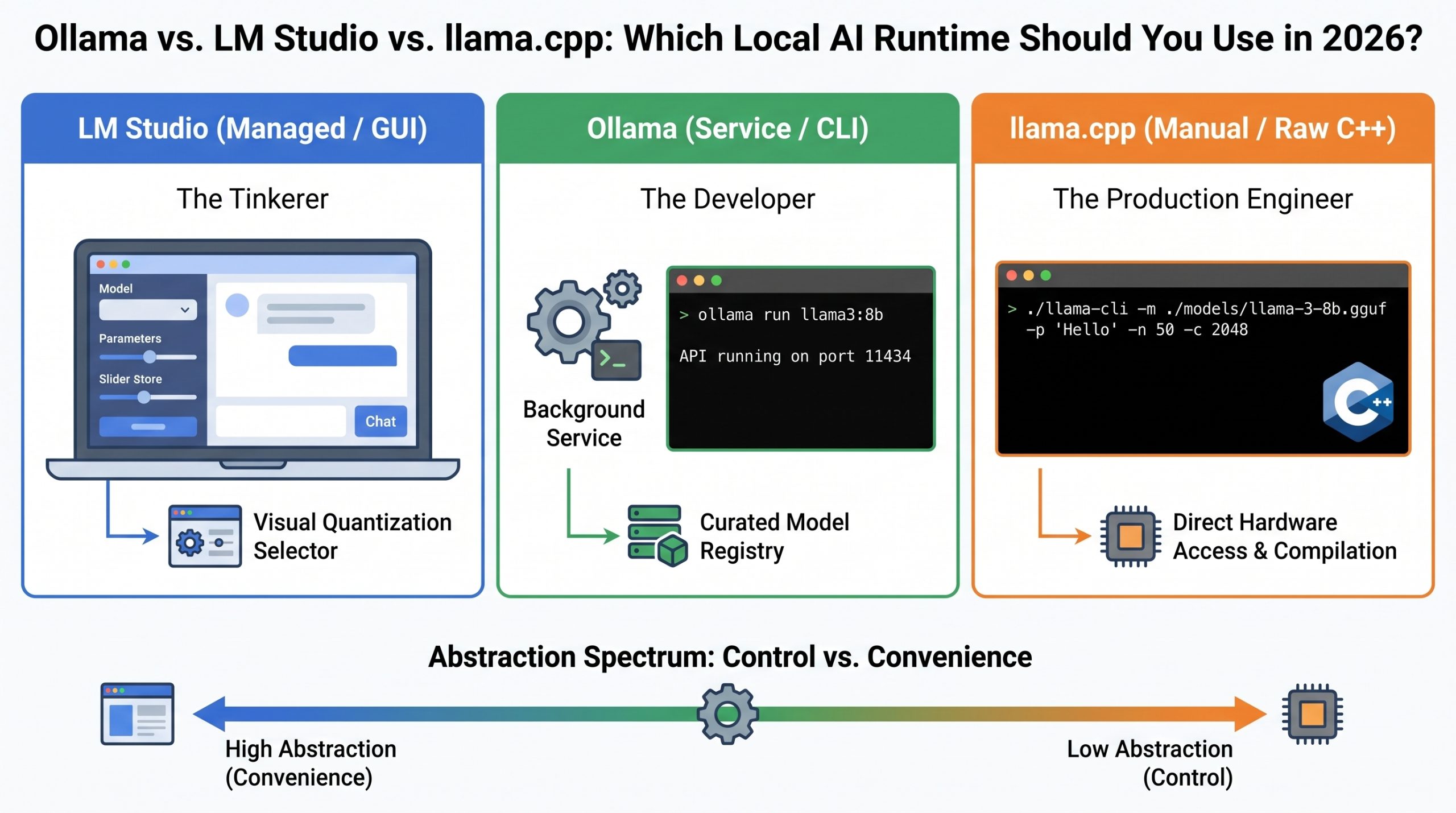
- LM Studio: Features automated, visual RAM and VRAM analysis. Upon selecting a model variant (e.g.,
Q4_K_M,Q8_0), the interface dynamically calculates system memory pressure and alerts the user if a given quantization level will overflow physical hardware boundaries. - Ollama: Simplifies quantization selection using tag-based naming conventions (e.g.,
llama3.2:latest, which defaults to 4-bit quantization). While users can import explicit GGUF quantization levels, Ollama prioritizes reasonable defaults over granular control. - llama.cpp: Offers full control over quantization mechanics. Practitioners can utilize raw quantization binaries (
llama-quantize) to fine-tune weight block conversions, set custom key-value (KV) cache precision levels (--cache-type-k f16,--cache-type-v q4_0), and precisely dictate GPU layer offloading with explicit parameters.
4. Model Discovery and Registry Architecture
- LM Studio: Features native search integration directly connected to Hugging Face’s repository. Users can search, filter by tag or quantization type, and download
.gguffiles directly into the application directory structure. - Ollama: Employs a curated, Docker Hub-like central registry (
ollama.com/library). Downloading models requires simple commands (ollama pull llama3.2). Custom models can be declared by pointing a localModelfileto external.gguffiles. - llama.cpp: Operates on a pure "Bring Your Own File" model. It has no built-in downloader; users manually fetch
.ggufweight files via tools likehuggingface-cliorwgetand point file paths to the compiled binary.
5. Update Cadence and Upstream Tracking
Because machine learning architectures mutate rapidly—with new attention mechanisms, activation functions, and context scaling techniques published weekly—runtime maintenance velocity is vital.
- llama.cpp: Functions as the primary open-source foundation. Commits are merged daily, ensuring day-zero support for newly published open-weights architectures.
- Ollama: Acts as a fast follower, pulling upstream C++ changes from
llama.cppon a weekly or bi-weekly basis and merging them into its Go wrapper and CLI toolset. - LM Studio: Operates on a structured release cycle, pushing desktop updates monthly. As a result, experimental or brand-new model architectures may experience brief support delays compared to direct command-line compilation.
Technical Code Contrast: One Task Across Three Abstractions
To demonstrate the runtime spectrum in practice, consider the execution step required to complete the exact same task: prompting a local Llama 3.2 3B model to return a single-word response ("Hello").
# ==============================================================================
# Execution Comparison: Initiating Local Inference on Llama 3.2 (3B)
# ==============================================================================

# ------------------------------------------------------------------------------
# 1. LM STUDIO (REST API Integration)
# Assumes LM Studio GUI is open and the local server is running on Port 1234.
# ------------------------------------------------------------------------------
curl http://localhost:1234/v1/chat/completions
  -H "Content-Type: application/json"
  -d '
        "model": "llama-3.2-3b",
        "messages": ["role": "user", "content": "Hello"],
        "temperature": 0.7
      '

# ------------------------------------------------------------------------------
# 2. OLLAMA (CLI Containerized Daemon)
# Executed directly in terminal; daemon automatically manages weight loading.
# ------------------------------------------------------------------------------
ollama run llama3.2 "Hello"

# ------------------------------------------------------------------------------
# 3. LLAMA.CPP (Direct C++ Binary Execution)
# Requires raw compiled binary, explicit path to GGUF, token limits, context
# allocations, and explicit GPU layer offload count (-ngl).
# ------------------------------------------------------------------------------
./llama-cli
  -m ./models/llama-3.2-3b-q4_k_m.gguf
  -p "Hello"
  -n 50
  -c 2048
  -ngl 33
Dissecting the llama.cpp Invocation:
-m ./models/llama-3.2-3b-q4_k_m.gguf: Direct filesystem path to the compiled tensor model weights.-p "Hello": The raw input text prompt.-n 50: Explicit instruction capping generation at 50 predicted tokens.-c 2048: Mandates the exact context window size allocation in system RAM/VRAM.-ngl 33: Tells the engine to offload precisely 33 neural network layers to the GPU acceleration interface (e.g., Metal or CUDA). Setting this value to0forces pure CPU execution.
Comprehensive Runtime Matrix
| Engineering Dimension | LM Studio | Ollama | llama.cpp |
|---|---|---|---|
| Primary Paradigm | Native Desktop Graphical Workstation | Background System Service / CLI | Compiled Low-Level C++ Binary |
| Underlying Engine | llama.cpp C++ Bindings |
llama.cpp C++ Core |
Native C/C++ (Bare Metal) |
| Default Server Port | 1234 (Manual/GUI Toggle) |
11434 (Daemon Always Active) |
8080 (via llama-server) |
| Model Distribution | Direct Hugging Face Search | Curated Registry + Modelfile |
Arbitrary GGUF Filesystem Paths |
| Hardware offloading | Automatic with Visual Slider Controls | Automatic GPU Layer Offloading | Manual (-ngl / --n-gpu-layers) |
| Context & Memory Tuning | GUI Interface Selectors | Environment Variables / Modelfile | Granular CLI Execution Parameters |
| Release Velocity | Monthly Desktop Releases | Weekly Integration Releases | Daily Upstream Commits |
| Deployment Suitability | Desktop Research, Interactive Testing | Local App Development, RAG Pipelines | Edge Production, Headless VPS, Embedded |
Official Perspectives & Persona Dynamics
Selecting an inference runtime is ultimately an exercise in matching abstraction levels to operational needs. Industry practitioners generally cluster into three distinct functional profiles.
                       PRACTITIONER MIGRATION PATHWAY

    +------------------------------------------------------------------+
    | PHASE 1: EXPLORATION                                             |
    | User relies on LM Studio for visual hardware estimation, prompt  |
    | playground testing, and quick Hugging Face weight checks.       |
    +------------------------------------------------------------------+
                                     |
                                     v Outgrows GUI / Needs Automation
    +------------------------------------------------------------------+
    | PHASE 2: APPLICATION DEVELOPMENT                             |
    | User migrates to Ollama for persistent system APIs, containerized|
    | workflows, and LangChain/LlamaIndex backend integration.         |
    +------------------------------------------------------------------+
                                     |
                                     v Outgrows Defaults / Needs Max Throughput
    +------------------------------------------------------------------+
    | PHASE 3: INFRASTRUCTURE OPTIMIZATION                             |
    | User transitions to raw llama.cpp binaries for custom quantization|
    | memory tuning, static compilation, and CI/CD headless execution. |
    +------------------------------------------------------------------+
The Interactive Tinkerer & Researcher (Choose LM Studio)
Practitioners evaluating newly released model architectures require fast visual feedback loops. LM Studio eliminates infrastructure overhead, offering explicit visual cues regarding parameter changes, side-by-side prompt performance evaluations, and hardware ceiling indicators. It serves as an ideal interactive playground for testing model capabilties before committing code.
The Application Software Engineer (Choose Ollama)
Engineers integrating local LLMs into client applications, background microservices, or retrieval-augmented generation (RAG) agent chains benefit most from Ollama. By running as a background service that automatically manages model loading and unloading based on API activity, Ollama mimics cloud infrastructure. It abstracts lower-level memory management details while exposing robust, production-ready local REST endpoints.
The Production Systems Engineer (Choose llama.cpp)
Engineers deploying models to headless edge servers, constrained hardware environments, or high-concurrency production setups require direct access to the metal. llama.cpp allows developers to bypass wrapper overhead, compile custom binaries optimized for specific instruction sets (such as AVX-512 or ARM NEON), dynamically tweak Key-Value cache precision, and maximize token throughput per watt.
Engineering Consensus: Open-source AI maintainers frequently emphasize that wrappers like Ollama and LM Studio are complementary to, rather than competitive with,
llama.cpp. Because downstream wrappers continuously pull upstream C++ performance enhancements, advancements in the foundational C++ codebase instantly propagate throughout the entire ecosystem.
Future Outlook: The Next Frontier of On-Device Inference
As open-source small language models continue to close the capability gap with cloud-hosted models, the role of local runtimes will expand significantly. Key developments reshaping this landscape include:
1. Hardware Integration and Unified Memory Architectures
The market share of systems featuring unified memory architectures—such as Apple Silicon and high-end ARM/x86 APUs—is growing rapidly. Future runtime iterations are moving beyond simple CUDA offloading toward native, multi-backend compute scheduling. Runtimes will dynamically route matrix operations across CPUs, GPUs, and Neural Processing Units (NPUs) simultaneously based on power limits and memory bandwidth constraints.
2. Advanced Inference Acceleration Techniques
Innovations such as Speculative Decoding (using an ultra-small draft model to predict tokens for a larger target model), dynamic KV cache compression, and flash attention variants are rapidly moving from academic papers to runtime implementations. llama.cpp continues to lead this integration, with downstream frameworks rapidly exposing these capabilities through higher-level APIs.
3. Native Agentic Scheduling and Parallel Context Processing
Future runtime engines will evolve beyond basic sequential single-prompt generation. As AI workflows transition toward complex, multi-agent systems, runtimes are adding native support for multi-tenant context caching, continuous batching, and parallel request queue management. These features will allow a single locally hosted model to serve dozens of concurrent agent execution loops without thrashing system VRAM.
Final Takeaway
The choice between Ollama, LM Studio, and llama.cpp is not a permanent strategic decision, but a choice of the right tool for a given developmental stage. Because all three runtimes rely on shared tensor standards like GGUF and common inference logic, developers can smoothly transition across the stack as their requirements evolve—moving seamlessly from GUI-driven prototyping to automated local services, and ultimately to low-level hardware orchestration.
